Thai audio and voice to text, with speaker labels and timestamps
Upload a Thai recording, audio or MP4 video up to 2 GB, and get a transcript in Thai script with every line labelled by speaker and time. English words said inside Thai sentences stay in English. Export TXT, SRT, VTT or DOCX, or have an AI note written in Thai or English. It is Thai voice to text for anything already recorded: meetings, interviews, voice memos and phone calls you have a recording of.
Last updated Scripta by SyncEdge
On this page
What makes Thai transcription different?
Thai is written without spaces between words, uses tone marks, and everyday Thai speech borrows English terms that are normally written in Latin script. A usable Thai transcript has to get all three right.
- Thai script without made-up spaces between words.
- English loanwords kept in Latin script, the way Thai offices write them ("ระบบ Payment", "ส่ง Test Plan").
- Regional speech (Isan, Northern, Southern) written in Thai script when you choose Thai as the spoken language. Dialect accuracy has not been measured systematically, so check passages that matter.
What does a Thai transcript look like?
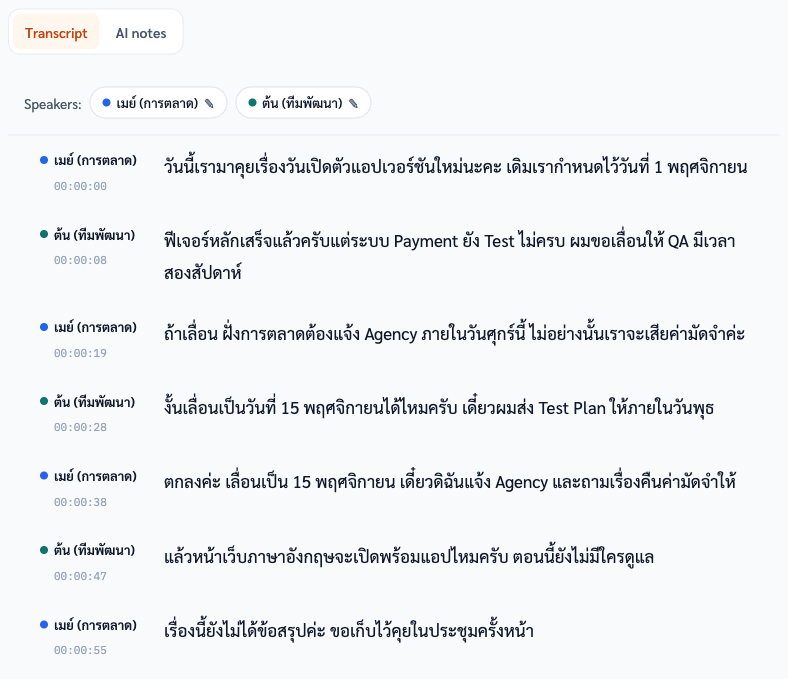
Here is a real transcript of a fictional meeting between two people, straight from the editor.
Which files can I upload?
MP3, M4A, WAV, FLAC, OGG, AAC and WebM audio, and MP4 video, up to 2 GB per file. Or record directly in the browser.
- Other video formats (MOV, MKV) need converting to MP4 first.
- There is no import from YouTube or other links.
Voice to text for phone calls, voice memos and WhatsApp voice notes
Yes, once the recording is a file. Scripta transcribes files you upload or record in the browser. It does not record phone calls or join them.
- iPhone Voice Memos saves M4A. Share the memo to Files, then upload it.
- Android recorder apps vary. MP3, M4A, WAV, OGG and AAC upload as they are; AMR and 3GP need converting first.
- WhatsApp voice notes are OGG audio, usually saved with a .opus extension. Save or export the note, then upload it. If the upload box does not accept the .opus file, rename it to .ogg.
- Phone calls: record with your phone's call recorder or a recording app, then upload the file it saves, if it is one of the formats above.
- Or open Scripta in your phone's browser and record there. There is a microphone test before you start, and the screen stays on while recording.
- Before recording a call or someone else's conversation, tell the other people and get their consent.
What can I export?
TXT, SRT, VTT and DOCX, in the edited version or the original, plus a read-only share link you can revoke.
[00:00:08] ต้น (ทีมพัฒนา): ฟีเจอร์หลักเสร็จแล้วครับแต่ระบบ Payment ยัง Test ไม่ครบ ผมขอเลื่อนให้ QA มีเวลาสองสัปดาห์
[00:00:19] เมย์ (การตลาด): ถ้าเลื่อน ฝั่งการตลาดต้องแจ้ง Agency ภายในวันศุกร์นี้ ไม่อย่างนั้นเราจะเสียค่ามัดจำค่ะ
[00:00:28] ต้น (ทีมพัฒนา): งั้นเลื่อนเป็นวันที่ 15 พฤศจิกายนได้ไหมครับ เดี๋ยวผมส่ง Test Plan ให้ภายในวันพุธ
Can I get an English summary of a Thai recording?
Yes. AI notes (meeting minutes, interview summaries, medical notes) can be written in English from Thai audio. The transcript itself stays in Thai: Scripta does not translate transcripts.
See an English interview summary written from a Thai interview on the interview transcription page, and what English notes from Thai audio can and cannot do on Thai audio to English notes.
What does it cost?
1 credit per minute: an hour of Thai audio is 60 credits, $9 pay-as-you-go. New accounts get 30 free credits.
Packs and worked costs on the pricing page.
Questions
Does it translate Thai to English?
Not the transcript: it stays in Thai. An AI note (minutes or a summary) can be written in English, with quotes kept in Thai plus an English rendering.
How accurate is it for Thai?
We do not publish accuracy figures. Clear audio with one person speaking at a time gives the best results; names, numbers and dialect passages are worth checking by ear.
Is there an API?
No, Scripta is a web app. There is no public API.
Try it on your own recording
Sign up free and get 30 credits, enough for 30 minutes of transcription. No card needed.